Phishing scams trip people up every day, whether it’s a fake email, sketchy text, or a convincing website that isn’t quite what it seems. With phishing tricks getting more realistic all the time, knowing how to spot them can save you a ton of stress and keep your information safe. From my own experiences handling suspicious messages, helping customers as a teller to determine if an email is a phishing scam, along with guidance from security experts, I’m here to break down the red flags and walk you through practical steps to help you steer clear of these scams.
What is a Phishing Scam?
A phishing scam is when someone tries to trick you into sharing sensitive information, like your passwords or bank details, by pretending to be a trustworthy contact or company. These scams often come as emails or texts that look familiar, featuring banks, online stores, or even your boss. Clicking links or downloading files in these messages can mean trouble, such as stolen identity or drained funds. Spotting the tricks scammers use is a smart move for staying secure online.
Phishing has been around since the mid-1990s. Even though security tools have become stronger, scammers constantly cook up new ways to fool people. While the classic “Nigerian prince” emails are easy to laugh at, today’s scams can look eye-catchingly authentic, copying company logos and using language that feels official. Many people stumble upon fake login screens that are nearly indistinguishable from the real ones, or receive slick messages pushing them into hasty decisions.
I receive phishing scams almost every day on my personal email address, but I know how to spot them pretty quickly and get rid of them. The financial institution I work at is very oriented when it comes to online security and so they will at times send out simulated phishing emails to see how we respond to them.
As technology continues to spread fast and more of our lives go digital, recognizing and stopping scams is more important than ever. Cyber crooks take advantage of both busy work life and personal stress, hitting us on our phones, email, and even through social networks or fake support calls. This makes learning to spot phishing attempts a must-have digital skill.
Biggest Signs You’re Looking at a Phishing Scam
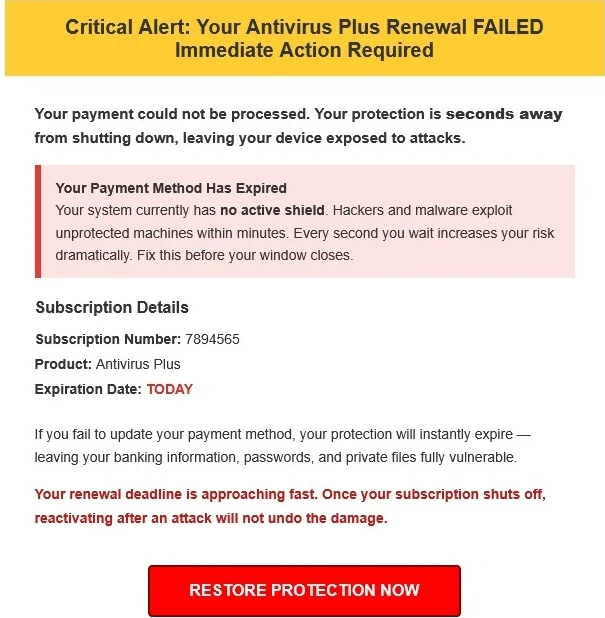
Certain warning signs come up again and again in phishing attempts. Here are five key things I always watch for whenever I get an unexpected message:
- Suspicious Sender: The email or text shows up from an address or phone you don’t recognize, sometimes with tiny tweaks to real company names (like “amaz0n-service” instead of “amazon”).
- Spelling and Grammar Goofs: Typos, odd phrasing, or strange grammar slip-ups often give away the scam. One thing I will have to say about this is that since the rise of AI, spelling and grammer mistakes are becoming less and less so that is something to watch out for.
- Urgency or Pressure: Phishing messages often push you to act fast. “Your account will be locked in 30 minutes.” They want you to click before thinking things through.
- Strange Links or Attachments: Any out-of-the-blue download or link should make you pause, especially if you didn’t expect anything.
- Requests for Private Info: Demanding passwords, Social Security numbers, or bank info should set off alarms. Legitimate companies almost never reach out for this by email or text.
Spotting just one of these signs is a warning; seeing several at once almost always signals a scam. I will say that the biggest of these signs in the email address where the phishing scam actually came from. While scammers may try to mask and say the email is from a legitimate company, once you reveal the actual email address, you’ll see the email address does not resemble the actual company at all.
Seven Red Flags That Mean “Scam Alert!”
Besides the main indicators, a few less obvious clues can pop up in phishing messages. I keep an eye out for these seven red flags whenever an email or text feels a little off:
- Generic Greetings: “Dear Customer” or “User” instead of your real name is a telltale sign of a mass scam attempt.
- Off-the-wall Requests: If someone is asking for you to buy and send gift card codes or wire money, it’s almost always a scam.
- Strange Formatting: Watch for odd fonts, wrong logos, or messy layouts. They give away low-quality scam work.
- Fake Websites: Scam links can lead you to domains that are spelled weirdly or are oddly long. “www.yourb4nk.com” instead of the real thing is a classic trick.
- Name and Address Mismatch: If “Apple Support” sends you an email from a random Gmail account, that’s a huge red flag.
- Suspicious Attachments: Unsolicited files, especially with endings like .exe or .zip, often hold malware.
- Unusual Requests for Secrecy: If you’re told to “keep things between us” or not tell your manager, it’s likely a scam, particularly at work.
The more familiar you become with these little details, the faster you’ll spot trouble. Always trust your instincts if something feels off.
How To Check an Email for Phishing
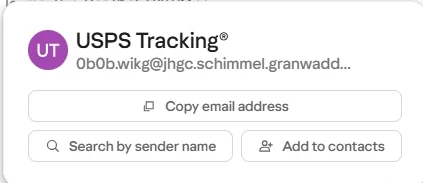
When sizing up emails, I run through a quick checklist to separate real from fake. Here’s how I break it down:
- Check the Sender’s Address: Hover over the “From” address (or tap on mobile) to see if it matches the company’s official domain. If not, be wary.
- Don’t Click Strange or Shortened Links: Move your mouse onto any links to preview their real destination. If it looks suspicious or hidden, do not click.
- See if It’s Personalized: Watch for info that’s generic or doesn’t speak to your actual business with the sender.
- Read the Language Carefully: Real companies have their emails checked. Weird grammar or clunky language is a sign of a scam.
- Look at the Signature Line: Authentic businesses include full contact info. A vague or incomplete signature should make you suspicious.
Never open attachments from unknown sources. If the sender looks familiar but something feels off, check directly with them through a trusted method, not by replying to the sketchy message.
How To Spot a Phishing Text Message (SMS)
Phishing isn’t limited to email. Fake text messages, also known as “smishing,” are getting more common. Here are a few differences to keep in mind when it comes to scam texts:
- Unknown or Odd Numbers: If the number is unfamiliar or just a few digits long, use caution.
- Weird URLs: Links in scam texts are often shortened or look scrambled. Don’t tap unless you absolutely know who sent it.
- Phony Offers or Urgent Requests: Messages promising prizes, gift cards, or warning about “urgent security updates” are major warning signs.
For suspicious links, I sometimes copy them and use a URL checker on a trusted device, but the safest bet is just ignoring them. If you get a text claiming to be from a bank or delivery service, search out their real contact details online and check in directly.
Why Phishing Works, and How to Outsmart It
Phishing works because it tugs at your emotions—urging you to act quickly, play on your curiosity, or make you nervous. Scammers put lots of effort into making their fakes plausible, so it’s easy to get fooled. The trick is to stay skeptical and double-check anything unusual.
I’ve had 2 customers earlier this year at the bank that I work at a teller at, fall for a phishing text they received on their phone. In this particular instance, the text claimed to be from FedEx and said that there was a problem with the delivery of their package and in order to fix it, they had to open the link that was included in the text. The problem is that it went to a fraudulent site meant to look like Fedex and asked for their debit card number so that there would be a small charge to fix the delivery issue.
This is where the phishing scam worked well, because these 2 customers were actually expecting packages from FedEx to be delivered. The problem is, the didn’t stop to think that this was a fraudulent scam and both lost a little bit of money before they realized it was a scam and we were able to shut down their debit cards before anymore money could be taken out.
Besides being cautious, keeping your devices and email safe with updates is key. Turn on two-factor authentication whenever possible; this means scammers can’t get in, even if they get your password. Staying updated by scanning examples of new scams helps you learn to spot patterns and avoid falling for the latest tricks.
If you want an extra safety net, tools like PhishTank let you check suspicious links for free, while Have I Been Pwned will let you know if your emails have been included in data leaks or breaches.
Practical Scenarios: What Phishing Looks Like in Everyday Life
Scammers get creative, and I’ve seen all sorts of attempts over the years. Sometimes it’s a fake energy bill with a blurry old company logo, or a phony Apple support message warning that my account will be closed unless I confirm my details. Here are some common examples you might spot:
- Fake Delivery Messages: “Your package couldn’t be delivered. Click here to reschedule.” Usually, the website has nothing to do with a legit courier service.
- Pretend Bank Alerts: “Unusual activity on your account. Sign in right away.” But the sender uses a Hotmail or Gmail address instead of a real bank email.
- Impersonation Email At Work: A message looks like it’s from your supervisor, asking you to buy gift cards and reply with the codes. (I see this scheme everywhere these days.)
If anything feels off—say a wrong logo, poor spelling, or strange links—take the extra step to check with the real company or the person directly before you do anything else.
Frequently Asked Questions
People always ask me about the best ways to spot phishing. Here are a few common ones:
Which of the following can be used to identify a phishing email?
Answer: Keep an eye out for mismatched sender addresses, demands for personal info, urgent requests, odd attachments, and typos.
How to check an email address for phishing?
Answer: Hover your cursor over the sender’s name to reveal the real address. Any mismatch with the company’s web domain is a strong sign of a scam. You can also look it up online or compare it to official previous emails.
How do I spot a phishing text message?
Answer: Watch out for unknown numbers, odd links, urgency, and “prize” or security warnings. If you’re unsure, call the company using their publicly listed phone number.
What are the 5 key signs and 7 red flags of phishing?
Answer: Five key signs: odd sender, spelling mistakes, urgent tone, unfamiliar links, and requests for sensitive information. Seven red flags: generic greetings, off-the-wall requests, strange formatting, phony sites, mismatched sender names, odd attachments, and suspicious secrecy.
Staying Safe From Phishing Scams
Online scams keep changing shape, so the best defense is to stay alert and build good habits. I trust a routine: question weird messages, never rush to click or download, and remember that if it sounds off, it probably is. Good spam filters catch a lot, but when you’re not sure, trust your gut and double-check before you act. One of the biggest things that phishing scams hope you rely on to fall them is emotion. They either want you to panic, or feel immense joy, so much so, that you won’t think logically. The more you get used to spotting those warning signs, the more confidently you’ll avoid even the most convincing phishing scams. Stay sharp and keep your digital world safe.